# Действия с подписью

При настройке печатной формы необходимо обратить внимание также на функции действий с подписью. В зависимости от документа требуется разное сочетание подписей от организации и от сотрудника.\
Чтобы перейти к настройке, необходимо открыть "Виды печатных форм" из ЛК Сотрудника. Выбрать нужный вид печатной формы и перейти в блок "Действия с подписью".

![](/files/QQLjWTS8O7FblHY4pOSr)

В раскрывающемся списке "Со стороны организации" и "Со стороны сотрудников" выбрать необходимый пункт. Далее нажать "Записать" или "Записать и закрыть".
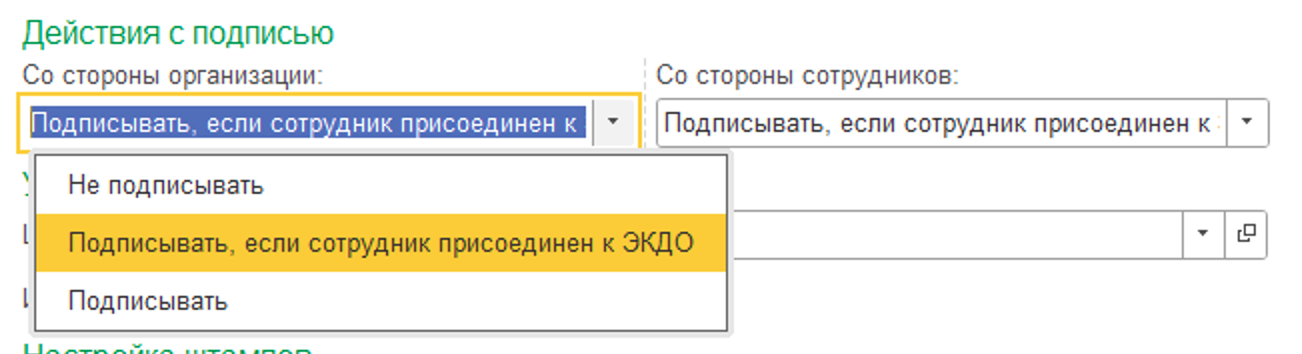
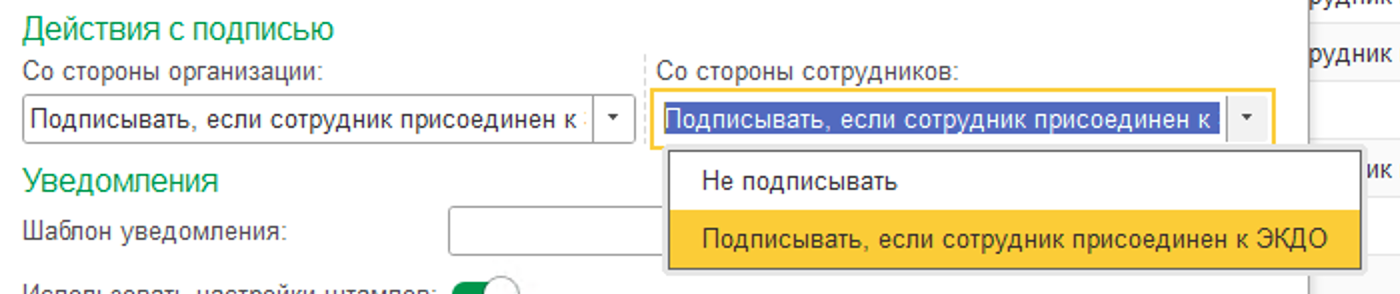
![](/files/4UjJsKi4OMUyQw1tdT1N)

![](/files/uABerPKV4DqMmTALcapp)


---

# Agent Instructions: Querying This Documentation

If you need additional information that is not directly available in this page, you can query the documentation dynamically by asking a question.

Perform an HTTP GET request on the current page URL with the `ask` query parameter:

```
GET https://padocs.empldocs.app/dlya-razrabotchikov/nastroika-kedo/nastroika-pechatnykh-form/spravochnik-vidy-pechatnykh-form/deistviya-s-podpisyu.md?ask=<question>
```

The question should be specific, self-contained, and written in natural language.
The response will contain a direct answer to the question and relevant excerpts and sources from the documentation.

Use this mechanism when the answer is not explicitly present in the current page, you need clarification or additional context, or you want to retrieve related documentation sections.
