# Ограничение просмотра печатных форм при отправке документов

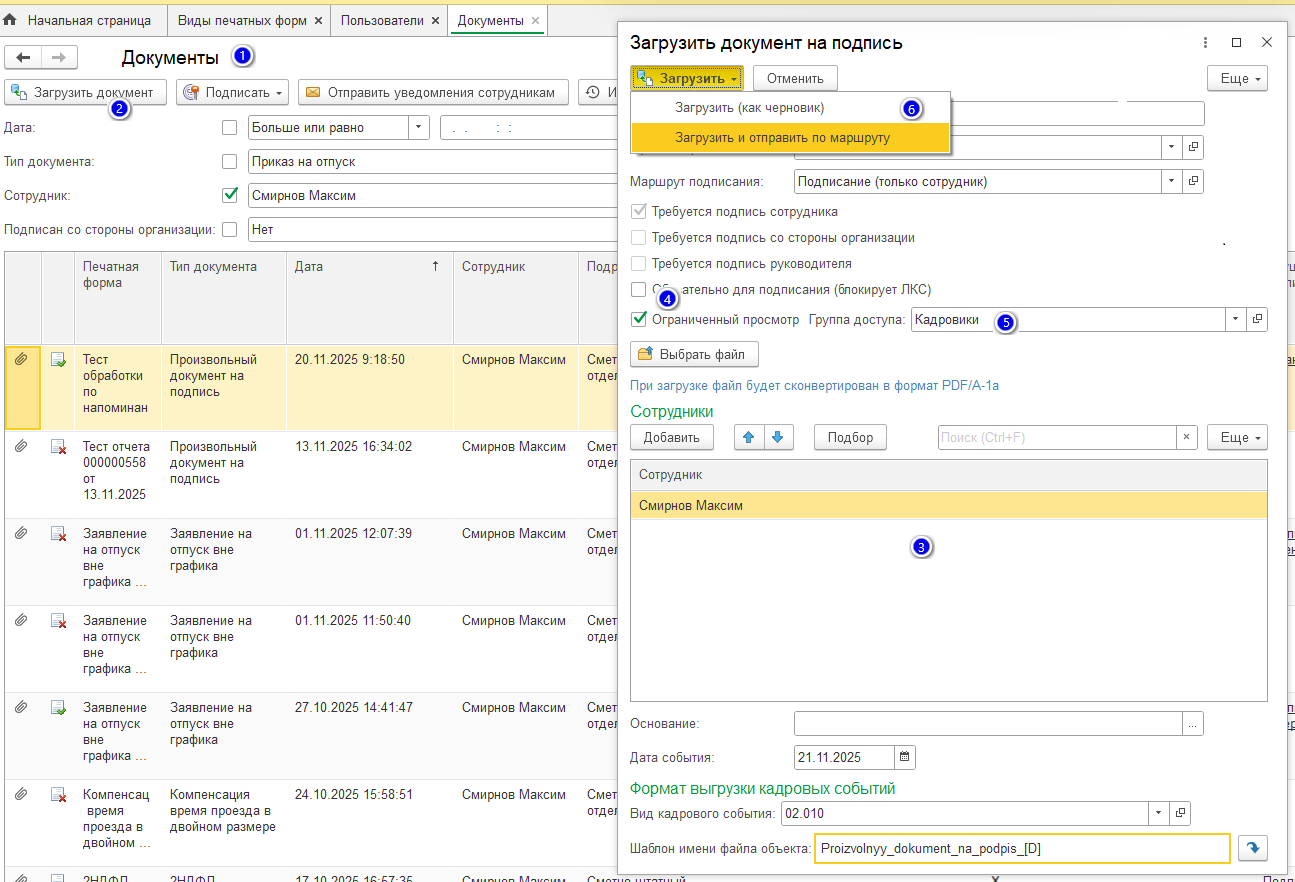
### Для отправки произвольного документа с ограниченным просмотром необходимо:

1\. Открыть форму работы с документами справочника Печатные формы (раздел Документы);

2\. Нажать на кнопку «Загрузить документ»;

3\. Заполнить обязательные поля формы загрузки документа на подпись;

4\. Установить чек – бокс «Ограниченный просмотр»;

5\. Выбрать (создать) группу доступа (ЛКС);

6\. Загрузить и отправить по маршруту.

<figure><img src="/files/fOjXrTAqvssE2RLS3jE6" alt=""><figcaption></figcaption></figure>

Отправленный произвольный документ будет доступен к просмотру (скачиванию архивом) в разделе Документы (а также в прикрепленных файлах документов 1С ЗУП) только для выбранной группы пользователей (ЛКС).


---

# Agent Instructions: Querying This Documentation

If you need additional information that is not directly available in this page, you can query the documentation dynamically by asking a question.

Perform an HTTP GET request on the current page URL with the `ask` query parameter:

```
GET https://padocs.empldocs.app/dlya-polzovatelei/kadrovyi-specialist/ogranichenie-prosmotra-pechatnykh-form-pri-otpravke-dokumentov.md?ask=<question>
```

The question should be specific, self-contained, and written in natural language.
The response will contain a direct answer to the question and relevant excerpts and sources from the documentation.

Use this mechanism when the answer is not explicitly present in the current page, you need clarification or additional context, or you want to retrieve related documentation sections.