# Раздел “Документы” часть 6

**Что можно делать в этой форме?**\
\
\- Можно группировать типы документов по кадровым событиям, а также по конкретному документу с помощью настроек списков. Отфильтровать подписания со стороны сотрудника, организации.

<figure><img src="/files/Nf5nshGnuIFBB1ZG6Ukv" alt=""><figcaption></figcaption></figure>

Также можно увидеть:<br>

* **Дата уведомления сотрудника** = дата последней отправки сотруднику
* **Дата подписи от организации**
* **Дата подписи сотрудником**

<figure><img src="/files/Z1ESqvmOTBAjESTs0yil" alt=""><figcaption></figcaption></figure>

А при пометке на удаление кадрового документа будет помечена соответствующая печатная форма и это отобразится в списке:
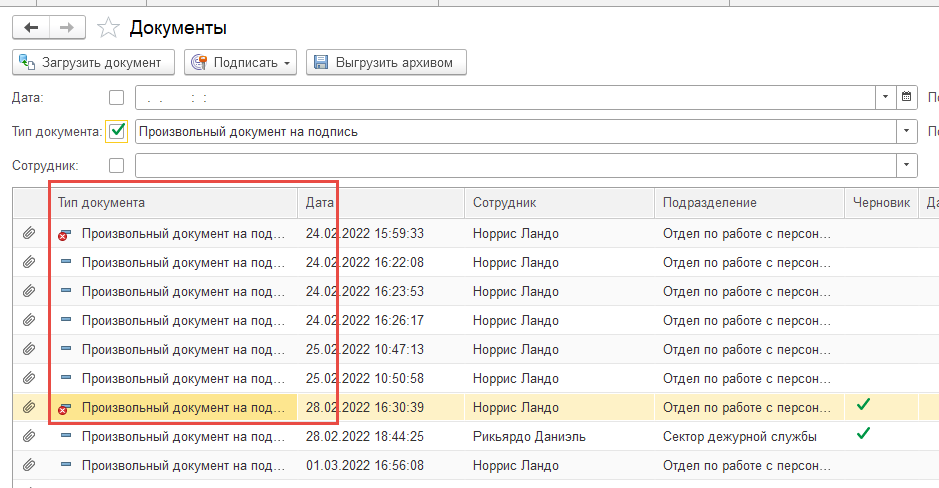
![](/files/wkmqtPzJunZRoIPWPfan)


---

# Agent Instructions: Querying This Documentation

If you need additional information that is not directly available in this page, you can query the documentation dynamically by asking a question.

Perform an HTTP GET request on the current page URL with the `ask` query parameter:

```
GET https://padocs.empldocs.app/dlya-polzovatelei/kadrovyi-specialist/kedo/razdel-dokumenty/razdel-dokumenty-chast-6.md?ask=<question>
```

The question should be specific, self-contained, and written in natural language.
The response will contain a direct answer to the question and relevant excerpts and sources from the documentation.

Use this mechanism when the answer is not explicitly present in the current page, you need clarification or additional context, or you want to retrieve related documentation sections.
